
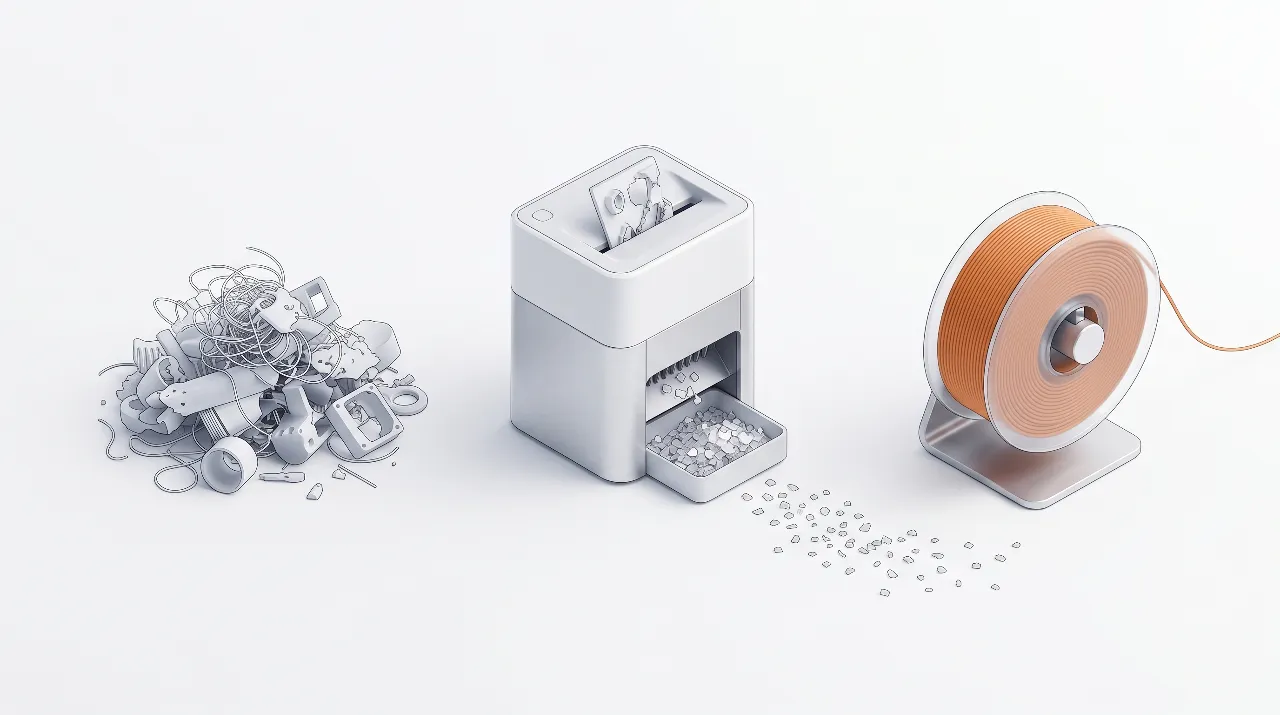
A 3D printer filament shredder gives makers, schools, and small studios a practical way to turn failed prints into new filament instead of waste. By adding a compact shredder and extruder next to your printers, you can build a closed-loop workflow that cuts material cost and reduces the volume of plastic going to landfill. At the desktop scale, most setups aim to shred scrap into 3–6 mm flakes so it can be dried and fed into a small filament extruder.
A practical example is the Energycle mini desktop small shredder, which is designed for makerspaces and small labs that need consistent regrind for extrusion.
ما هي آلة تمزيق خيوط الطابعة ثلاثية الأبعاد؟
A 3D printer filament shredder is a compact plastic shredder designed specifically to chop 3D printing waste and filament into small flakes for recycling. Unlike large industrial granulators, these machines sit on a workbench, plug into standard power, and handle the output volume of hobbyists, classrooms, and small labs. The shredder’s cutting chamber and hopper are sized for failed prints, support structures, purge towers, and leftover spools instead of bulky industrial parts.
A typical 3D printer filament shredder uses counter‑rotating blades to bite through plastic and push it through a fixed screen. The screen defines the flake size, often in the 3–6 mm range for desktop units. This flake size feeds well into small filament extruders and avoids clogging, while still keeping throughput high enough for day‑to‑day use. Many units also accept other rigid plastics such as bottle caps and lab samples, which gives makerspaces more flexibility in what they can recycle.
Why makers and schools need a filament shredder
A filament shredder for 3D printers solves three common problems: growing bins of failed prints, rising filament costs, and pressure to improve sustainability. In a typical classroom or shared makerspace, support material and failed prints can easily add up to multiple kilograms per term, and most municipal recycling streams won’t take mixed, unlabeled 3D printing plastics. A dedicated shredder lets staff convert that pile into a labeled stock of clean flakes ready for experiments, materials lessons, or recycled prototypes.
For makerspaces, the shredder turns messy scrap into a controlled resource. Members can sort waste by polymer, shred it on demand, and use it as feedstock for a shared filament extruder or send it to a local recycler that accepts pre‑processed flakes. This improves space use, reduces trash pickups, and creates a visible sustainability story that is easy to communicate to students, parents, and sponsors.
How a filament shredder fits into a closed-loop workflow
A 3D printer filament shredder is the front end of a closed‑loop 3D printing workflow that goes from waste prints back to usable filament. A practical maker‑scale loop includes collecting, sorting, shredding, drying, extruding, and printing again. When you treat each step as a small, repeatable routine, even beginners can run a basic recycling program alongside normal printing.
If your goal is to start with a compact, bench‑friendly unit, a mini desktop plastic shredder for 3D printing waste is typically the most straightforward first step.
Typical closed-loop steps are:
- جمع وفرز – Keep separate bins for PLA, ABS, PETG, and other polymers; avoid mixing types because mixed flakes produce inconsistent filament.
- Inspect and clean – Remove metal inserts, screws, magnets, tape, labels, and flexible pads so only clean thermoplastic enters the shredder.
- تمزيق – Use your 3D printer filament shredder to reduce prints to uniform flakes around 3–6 mm, which feed well into desktop extruders.
- Dry and store – Condition the flakes to very low moisture (often under about 0.05% by weight) and store them in sealed containers until extrusion.
- بثق – Run the dry flakes through a filament extruder such as a desktop Felfil or 3devo system to produce 1.75 mm or 2.85 mm filament.
- Print again – Use recycled filament for prototypes, test pieces, and non‑critical parts, while gradually dialing in print settings for more demanding jobs.
This closed‑loop workflow can be as simple or advanced as your lab equipment allows. A school might stop at step four and send dried flakes to an external recycler, while a makerspace could complete all six steps and share a spreadsheet to track how many kilograms of waste they convert each term.
PLA vs ABS vs PETG: shredding differences
PLA, ABS, and PETG all behave differently in a 3D printer filament shredder, so you need to adjust expectations and settings. PLA is generally brittle and easy to break into clean flakes, which makes it a popular starting point for desktop recycling projects. ABS and PETG are tougher, so they put more load on the motor and blades and may require smaller pieces before shredding.
Mechanically recycled PLA typically follows a sequence of shredding (and optional washing), drying, and extrusion, with careful temperature control to limit polymer degradation. ABS needs higher extrusion temperatures and is more sensitive to fumes and ventilation needs, while PETG is especially sensitive to moisture and can bubble if it is not dried thoroughly. In all three cases, keeping each batch limited to a single polymer type greatly improves extruder stability and filament quality.
Recommended flake size for filament extrusion
The best flake size for filament extrusion is small enough to feed smoothly and melt evenly, but not so tiny that it turns into unmanageable dust. Many desktop systems target particles at or below ~4 mm, while others aim for 3–6 mm regrind to balance throughput and extruder compatibility.
For most desktop filament extruders, flakes in the roughly 3–6 mm range are a good starting point. Larger chunks can bridge in the hopper or cause irregular melt flow, while excessive fines may burn and create fumes or clog the screw. A practical rule for makers and schools is to visually check that each piece is smaller than the extruder intake opening and to screen out powder‑like material where possible. You can use a simple sieve or mesh tray to separate usable flakes from dust and keep the extruder running reliably.
Desktop filament shredder options for makers, schools, and studios
Desktop filament shredders and recyclers vary widely in throughput, footprint, and cost. Energycle’s Mini Desktop Small Shredder is designed as a compact workbench unit that handles 1–5 kg/h of 3D printing waste, bottle caps, and lab samples, producing 3–6 mm regrind suitable for filament extrusion. Systems from Felfil, 3devo, Creality, and Loop combine shredders with filament extruders and spoolers to form a complete recycler for home or lab use.
For specs, footprint, and typical output size, see the Energycle mini desktop shredder for filament recycling.
Key selection filters (especially for schools and makerspaces):
- Safety & access control: interlocks/guards, safe hopper design, emergency stop, and clear SOPs for student use.
- Material discipline: can you realistically keep PLA/ABS/PETG separated and dry?
- Throughput vs noise: a bench-top unit that fits the room and can run without disrupting classes usually wins over raw kg/h.
| System / Shredder option | Best for users | Typical throughput (shredder) | Compatible materials (shred) | Footprint & noise | Approximate system scope | Notes for schools & makerspaces |
|---|---|---|---|---|---|---|
| Energycle Mini Desktop Small Shredder + desktop filament extruder | Schools, makerspaces, small studios | 1–5 kg/h, 3–6 mm flakes | PLA, ABS, PETG, bottle caps, small lab samples | Compact desktop unit, designed for shared tables, moderate noise with enclosure | Shredder plus separate extruder (e.g., third‑party desktop extruder) | Safer hopper and manageable size for classrooms, simple workflow for student projects; good match with Energycle desktop plastic shredder guide. |
| Felfil System (Felfil Shredder + Evo + Spooler) | Advanced hobbyists, design labs | Maker‑scale throughput, tuned for chopped prints and pellets | PLA, ABS, PETG and others from pellets or chopped waste | Bench‑top footprint, consumer‑grade appearance | Complete recycler: shredder, extruder, spooler in coordinated system | Suitable for university labs wanting a “ready to use” package with documented extrusion settings. |
| 3devo GP20 Shredder + Filament Maker | Professional labs, R&D, industrial training | Higher throughput and more advanced controls | PLA, ABS, PETG, engineering plastics (depending on configuration) | Larger footprint, more industrial feel | Integrated workflow with advanced temperature and drying options | Good for engineering schools with dedicated materials labs and staff to run more complex cycles. |
| Creality Shredder R1 + Filament Maker M1 | Makers who want a branded closed‑loop system | Up to about 1 kg/h filament output claimed for the system | PLA, ABS, PETG, ASA, PA, PC, TPU, PET | Designed to sit beside consumer 3D printers | Two‑device closed‑loop workflow promoted for desk‑side use | Attractive option for Creality printer owners once widely available; early adopters should watch real‑world reviews. |
| Loop / other all‑in‑one recyclers | Early adopters, showcase spaces | Quiet shredding with integrated extrusion (specs vary) | Focus on 3D print scrap; details vary by system | Enclosed, premium design | مكبس مركزي بمراحل توجيهية | يعد مثاليًا للمعرضات والتوعية حيث يهم الجمال والبساطة أكثر من الكفاءة. |
إذا كنت تبحث عن مكبس قطع مخصص يتناسب مع الأدراج الحالية ويعمل مع مجموعة متنوعة من مكابس الطباعة بالفيلامنت، فإن مكبس Energycle Mini Desktop Small Shredder هو خيار قوي لتثبيت نظامك. يمكنك قراءة المزيد عن أنواع مكابس الشredder المكتبية العامة وقواعد الاختيار في دليل مكبس الشredder المكتبية الخاص بـ Energycle.
تكلفة وتسديد تكلفة إعداد إعادة التدوير على نطاق صانع
يضيف مكبس شredder للفيلامنت وأداة الطباعة تكلفة مبدئية، لذا يساعدك ذلك في تقدير تسديد التكلفة باستخدام نموذج بسيط. يمكن للفيلامنت المعاد تدويرها خفض تكلفة المواد الفعالة الخاصة بك لكل كيلوغرام إذا قمت بإنتاج كمية كافية من القمامة النظيفة، المميزة، والمركبة من مادة واحدة لضمان تشغيل النظام بانتظام. للمدارس ومساحات التصنيع التي تشتري بالفعل العديد من الدوارات كل عام، يمكن أن تكون الادخارات والقيمة التعليمية مبررة للإعداد.
إليك مثال يمكنك تعديله بناءً على أرقامك الخاصة (استخدم نطاقات إذا لم تكن لديك بيانات دقيقة بعد):
- افترض أن مختبرك ينتج حوالي 5-50 كغ/سنة من القمامة النظيفة، القابلة للفرز، من PLA (منشأة صغيرة → مختبر مدرسي كبير).
- تكلفة فيلم PLA الجديد تتراوح حوالي US$15-30/كغ مقدمة (تختلف بناءً على العلامة التجارية والمنطقة).
- يبلغ تكلفة مجموعة الشredder المكتبية+Aداة الطباعة US$2,000-10,000+, مع توقعات العمر المتوقع 3–5 years.
- تكلفة الطاقة والصيانة تتراوح حوالي US$0.50-2.00/كغ من الفيلامنت المعاد تدويرها.
إذا كان الفيلامنت المعاد تدويره يبدل جزءًا كبيرًا من الفيلامنت المشتروها، فإن فترة تسديد التكلفة الفعالة غالبًا تتراوح بين 1-4 سنة على نطاق صانع/مدرسة (تعتمد بشكل كبير على كمية القمامة والوقت الفعلي للآلة).
إذا لم تريد نشر الأرقام، يمكنك أيضًا إعادة كتابة هذا الفصل كقائمة مرجعية (ما يجب قياسه) وإزالة جميع الأرقام بالدولار.
مثال عملي (بسيط، محافظ):
- القمامة المتاحة: 15 كغ/سنة PLA (منظمة + جافة)
- تكلفة فيلم PLA الخام: US$22/كغ → الإنفاق السنوي المُستبدل ≈ US$330
- Upfront equipment: US$5,000 over 4 years → ≈ US$1,250/year
- Electricity + wear parts: US$1.20/kg → ≈ US$18/year
This rough example shows why utilization matters: payback improves dramatically if the lab can recycle closer to the upper end of the scrap range (or share the recycler across multiple printers/classes).
Practical safety and maintenance tips
Safe operation is essential when adding a filament shredder to a classroom or makerspace. According to Energycle and other desktop shredder suppliers, users should only feed clean, known plastics and never treat the shredder as a general trash bin. Guards, interlocks, and emergency stop switches should stay in place at all times, and operators should receive a short briefing before use.
A few practical tips for smooth operation are:
- Place the shredder on a stable surface, away from student walkways, and secure any loose power cables.
- Use eye and hearing protection as needed, and consider scheduling shredding sessions when the room is less crowded.
- Clean the hopper and cutting chamber regularly to remove dust and stringy residue that can build up around the blades.
- Check blade sharpness and screen condition on a routine schedule and replace worn parts to maintain flake quality and keep power draw under control.
Good maintenance not only protects users but also keeps flake size consistent, which directly affects extrusion stability and filament diameter control. In our experience helping education clients, assigning a small “materials team” of students or staff to manage sorting, shredding, and record‑keeping works much better than sharing responsibility without a clear owner.
How to set up a simple shredder-to-extruder workflow
Setting up a filament recycling loop around a mini desktop shredder is easier if you treat it like a small production line. According to Energycle’s maker‑scale workflow, the key is to keep each step simple and repeatable instead of trying to shred and extrude everything at once. A small laminated checklist near the machine can guide students through the process.
A straightforward sequence for a school or makerspace looks like this:
- Label bins by material and color family (PLA light, PLA dark, ABS, PETG) and post a photo guide above the bins.
- Schedule a weekly shredding session where a trained student or staff member inspects, cleans, and shreds the accumulated prints using the Energycle mini desktop shredder.
- Dry the collected flakes in a low‑temperature oven or dedicated dryer using settings recommended by your extruder manufacturer.
- Store dry flakes in airtight containers with desiccant packs and date labels so you can track batch age.
- Run the filament extruder خلال جلسة مختبر أو نادي الصناع، تسجيل درجة الحرارة، سرعة السبيكة، وسرعة المزلاج لكل دفعة من المواد.
- طباعة وحدات اختبارية مع كل دفعة جديدة من المواد المعاد تدويرها، واسمح للطلاب قياس الخصائص الميكانيكية والمساحية مقارنة بالألياف الخام.
هذا النظام يعمل على إنشاء العديد من فرص التعلم حول علوم المواد، الاستدامة، التحكم في العملية، والتأكد من الجودة. ربط ذلك بالدليل التوجيهي الخاص بـ Energycle لمحطم الألياف البلاستيكية المكتبية وأداة تقسيم الألياف البلاستيكية للاستخدام في التدوير من مواردك الداخلية يساعد الطلاب على العثور على قراءات إضافية حول اختيار الأجهزة والcycles المتقدمة.
Step-by-step: preparing and shredding 3D print waste
Beyond the high-level closed-loop workflow, here is the practical hands-on procedure for getting failed prints ready and turning them into clean flakes.
الخطوة الأولى: فرز مطبوعاتك حسب نوع البلاستيك أولاً
Before you shred anything, separate waste by polymer. Mixing plastics is the fastest way to ruin recycled material. PLA is easiest for small-scale recycling; ABS is more temperature resistant but sensitive to contamination; PETG should be kept separate from PET bottle streams; TPU is flexible and needs more attention to feeding; nylon and fiber-filled filaments can be abrasive — if unsure, keep them out of a small desktop unit. قاعدة عامة: if you cannot confidently identify the filament type, keep it out of your recycling batch.
الخطوة الثانية: إزالة التلوث الذي يسبب ضعف الخيوط المعاد تدويرها
A mini shredder handles plastic — it should not be your dustbin. Before shredding, remove adhesive residue from tape or build-plate glue, metal parts such as embedded nuts, heat-set inserts, magnets and screws, labels and paper, and non-matching plastics like silicone pads, rubber feet or foam. If parts are dirty with oils or heavy dust, wipe them down and let them fully dry — moisture and debris show up later as bubbles, weak layers, or inconsistent extrusion.
الخطوة 3: تحضير القطع لتسهيل التغذية
- قم بتقسيم الأجزاء الكبيرة جدًا إلى قطع أصغر باستخدام الأدوات اليدوية.
- تجنب إدخال القطع الطويلة والرفيعة التي يمكن أن تتكتل في القادوس.
- حافظ على وتيرة تغذية ثابتة بدلاً من إفراغ صندوق القمامة الممتلئ دفعة واحدة.
الخطوة الرابعة: قطّع إلى رقائق متجانسة
Your goal is not “as small as possible” — it is ثابت. Aim for flakes that flow without clumping, are not so fine they turn into dust, and fit the intake requirements of your next step. If your next step is filament extrusion, uneven chunks cause surging feed rate, temperature swings, and poor diameter control.
الخطوة الخامسة: حافظ على الرقائق نظيفة وجافة ومُصنّفة.
Once shredded, treat flakes like raw material. Store in sealed containers, label by polymer, brand and color, and if you live in a humid area use desiccant packs or dry the material before extrusion. A small habit here saves hours later.
استكشاف الأخطاء وإصلاحها: المشكلات الشائعة عند تمزيق نفايات الطباعة ثلاثية الأبعاد
Flakes are inconsistent
- أطعمهم بوتيرة ثابتة.
- Pre-break large parts.
- تجنب خلط المواد المرنة مع المواد الصلبة.
Material jams
- تقليل حجم القطعة.
- لا تجبر نفسك على تقطيع قطع طويلة ورفيعة.
- أوقف تشغيل الآلة قبل إزالة أي انحشار.
Too much dust
- Avoid over-shredding.
- نظف الحجرة والمنطقة المحيطة بها بعد الاستخدام.
- ضع في اعتبارك اتباع روتين أساسي للتحكم في الغبار في مكان عملك.
Recycled filament prints poorly
- تأكد من عدم خلط البوليمرات.
- جفف الرقائق قبل عملية البثق.
- حافظ على مستوى التلوث منخفضاً.
Quick safety checklist for desktop shredding
- ارتدِ واقياً للعينين.
- أبقِ يديك بعيداً عن فتحة التغذية.
- لا تقم بإزالة أي انحشار أثناء تشغيل الجهاز.
- لا تقم بتمزيق المواد المجهولة.
- حافظ على نظافة المنطقة لتجنب الانزلاق على رقائق الثلج.
أسئلة شائعة حول محطمات الألياف البلاستيكية للطابعات ثلاثية الأبعاد
ما هي آلة تمزيق خيوط الطابعة ثلاثية الأبعاد؟
محطم الألياف البلاستيكية للطابعات ثلاثية الأبعاد هو محطم بلاستيكي صغير مصمم لمعالجة الطابعات الثلاثية الأبعاد الفاشلة، الهياكل الداعمة، والألياف البلاستيكية المتبقية إلى شرائح مناسبة للتصفيح. بالمقارنة مع المحطمات العامة، يركز على حجم المكونات، والمواد، والقدرة على التدفق التي ينتجها المستخدمون المنزليون، والمدارس، ومساحات الصناعين. يمكن لمستويات المكتب أن تقطع بلاستيكاً صلباً متوافقاً مثل قبعات القوارير أو عينات مختبر بسيطة، مما يزيد من استخدامه كأداة تدوير مبتدئة.
هل يمكنني تحويل الطابعات الفاشلة إلى ألياف؟
يمكنك تحويل العديد من الطابعات الفاشلة إلى ألياف إذا قمت بفرزها حسب المادة، تقطيعها إلى حجم الشرائح المناسب، تجفيفها بشكل تام، ثم مرورها عبر محطم الألياف. في الواقع، يمكن تحسين التركيز وتقليل تأثير التقدم في العمر عن طريق خلط شرائح المعاد تدويرها مع جزء من الأقراص الخام. يبدأ معظم المستخدمين بـ PLA، التي هي أسهل لمعالجتها، ويجربون ABS وPETG تدريجياً بمجرد فهمهم أجهزتهم.
ما هو حجم الشرائح الذي يعمل بشكل أفضل للتصفيح؟
لمعظم المحطمات المكتبية، حجم الشرائح حوالي 3-6 ملم يوازن بين تدفق السهولة في التقطيع. على سبيل المثال، يهدف محطم Shredder R1 من Creality إلى جسيمات عند أو أقل من حوالي 4 ملم، بينما ينتج محطم المكتب الصغير من Energycle 3-6 ملم من النفايات المعدة للتصفيح للطابعات الثلاثية الأبعاد والقبعات البلاستيكية. الحفاظ على الشرائح تحت هذا النطاق يقلل من التشابك ويساعد السبيكة على الذوبان بشكل متساوٍ، بينما يساعد التصفية على تجنب الاحتراق والإغلاق.
PLA مقابل ABS: أيهما أسهل للتقطيع؟
PLA عادةً أسهل للتقطيع من ABS لأنها أكثر هشاشة وتكسر إلى شرائح نظيفة تحت السكاكين. ABS تتميل إلى الانحناء والتشوه قبل التكسر، لذا قد تحتاج إلى قطع الأجزاء الكبيرة إلى أجزاء أصغر، وقد يستفيد من قطع الأجزاء الكبيرة إلى أجزاء أصغر. وفقًا للدليل على تدوير الطباعة الثلاثية الأبعاد، يمكن تدوير كلا البلاستيكين بنجاح، ولكن يُنصح عادةً بـ PLA للتجارب المغلقة الأولى في المدارس والمساحات الصناعية.
نداء إلى العمل: بناء نظامك المغلق للألياف البلاستيكية
A 3D printer filament shredder is the easiest starting point for schools, makers, and small studios that want to take control of their plastic waste. By adding a compact shredder such as the Energycle Mini Desktop Small Shredder and pairing it with a suitable filament extruder, you can turn bins of failed prints into a reliable source of recycled filament for prototypes and teaching projects. To plan your setup in more detail, review Energycle’s desktop plastic shredder guide and 3D printer filament shredder recycling guide, then map out how much scrap you generate and what closed‑loop workflow fits your space. If you want the full picture of the closed loop — shredding, drying, extrusion, and spooling — see our complete 3D printer filament recycler guide.
