
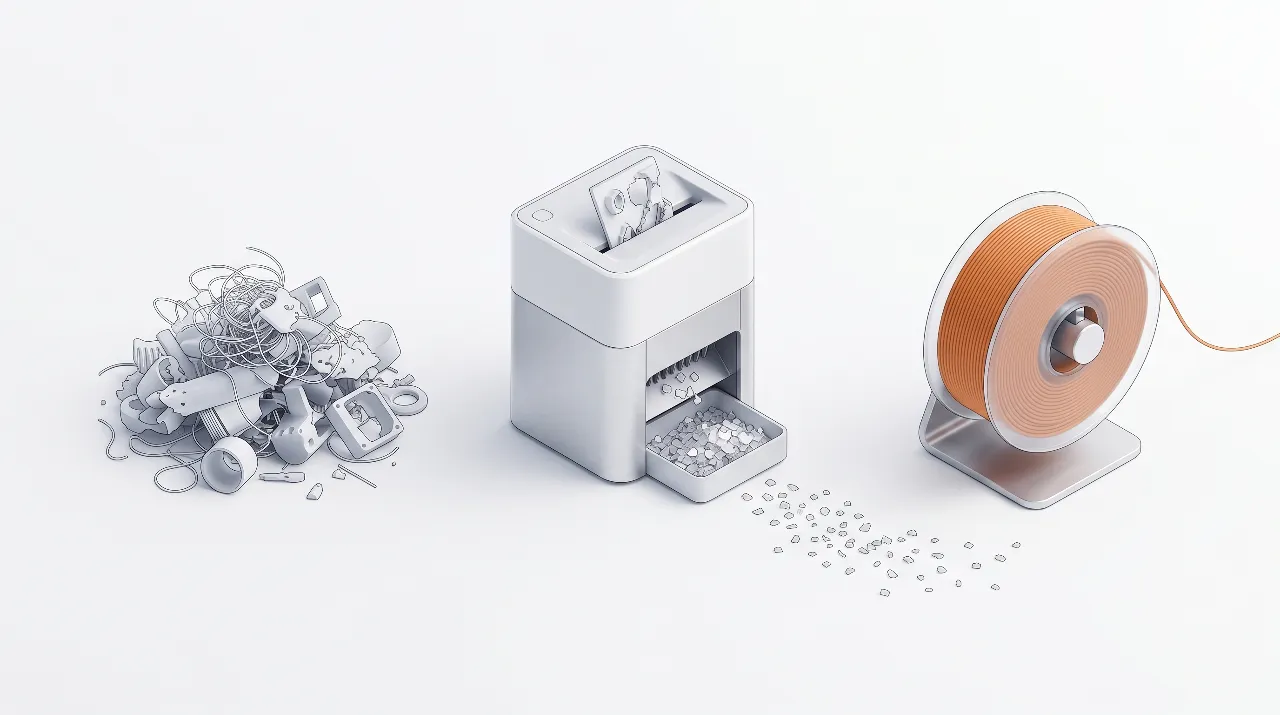
A 3D printer filament shredder gives makers, schools, and small studios a practical way to turn failed prints into new filament instead of waste. By adding a compact shredder and extruder next to your printers, you can build a closed-loop workflow that cuts material cost and reduces the volume of plastic going to landfill. At the desktop scale, most setups aim to shred scrap into 3–6 mm flakes so it can be dried and fed into a small filament extruder.
A practical example is the Energycle mini desktop small shredder, which is designed for makerspaces and small labs that need consistent regrind for extrusion.
3D 프린터 필라멘트 슈레더란 무엇인가요?
A 3D printer filament shredder is a compact plastic shredder designed specifically to chop 3D printing waste and filament into small flakes for recycling. Unlike large industrial granulators, these machines sit on a workbench, plug into standard power, and handle the output volume of hobbyists, classrooms, and small labs. The shredder’s cutting chamber and hopper are sized for failed prints, support structures, purge towers, and leftover spools instead of bulky industrial parts.
A typical 3D printer filament shredder uses counter‑rotating blades to bite through plastic and push it through a fixed screen. The screen defines the flake size, often in the 3–6 mm range for desktop units. This flake size feeds well into small filament extruders and avoids clogging, while still keeping throughput high enough for day‑to‑day use. Many units also accept other rigid plastics such as bottle caps and lab samples, which gives makerspaces more flexibility in what they can recycle.
Why makers and schools need a filament shredder
A filament shredder for 3D printers solves three common problems: growing bins of failed prints, rising filament costs, and pressure to improve sustainability. In a typical classroom or shared makerspace, support material and failed prints can easily add up to multiple kilograms per term, and most municipal recycling streams won’t take mixed, unlabeled 3D printing plastics. A dedicated shredder lets staff convert that pile into a labeled stock of clean flakes ready for experiments, materials lessons, or recycled prototypes.
For makerspaces, the shredder turns messy scrap into a controlled resource. Members can sort waste by polymer, shred it on demand, and use it as feedstock for a shared filament extruder or send it to a local recycler that accepts pre‑processed flakes. This improves space use, reduces trash pickups, and creates a visible sustainability story that is easy to communicate to students, parents, and sponsors.
How a filament shredder fits into a closed-loop workflow
A 3D printer filament shredder is the front end of a closed‑loop 3D printing workflow that goes from waste prints back to usable filament. A practical maker‑scale loop includes collecting, sorting, shredding, drying, extruding, and printing again. When you treat each step as a small, repeatable routine, even beginners can run a basic recycling program alongside normal printing.
If your goal is to start with a compact, bench‑friendly unit, a mini desktop plastic shredder for 3D printing waste is typically the most straightforward first step.
Typical closed-loop steps are:
- 수집 및 정리 – Keep separate bins for PLA, ABS, PETG, and other polymers; avoid mixing types because mixed flakes produce inconsistent filament.
- Inspect and clean – Remove metal inserts, screws, magnets, tape, labels, and flexible pads so only clean thermoplastic enters the shredder.
- 조각 – Use your 3D printer filament shredder to reduce prints to uniform flakes around 3–6 mm, which feed well into desktop extruders.
- Dry and store – Condition the flakes to very low moisture (often under about 0.05% by weight) and store them in sealed containers until extrusion.
- 엑스트루드 – Run the dry flakes through a filament extruder such as a desktop Felfil or 3devo system to produce 1.75 mm or 2.85 mm filament.
- Print again – 당사는 고객님의 요구 사핌에 맙시다. 요구 사항에 맞는 최적의 솔룓션을 제공해 드리겨요.
This closed‑loop workflow can be as simple or advanced as your lab equipment allows. A school might stop at step four and send dried flakes to an external recycler, while a makerspace could complete all six steps and share a spreadsheet to track how many kilograms of waste they convert each term.
PLA vs ABS vs PETG: shredding differences
PLA, ABS, and PETG all behave differently in a 3D printer filament shredder, so you need to adjust expectations and settings. PLA is generally brittle and easy to break into clean flakes, which makes it a popular starting point for desktop recycling projects. ABS and PETG are tougher, so they put more load on the motor and blades and may require smaller pieces before shredding.
당사는 다얯한 플라스틱 재활용 분야에서 축적된 풍부한 경험을 바탐으로, PLA, ABS, PETG를 포함한 모든 유형의 픈라스틊에 적합한 최적의 솔룤션을 제공해 드릴 수 있습니다.
Recommended flake size for filament extrusion
The best flake size for filament extrusion is small enough to feed smoothly and melt evenly, but not so tiny that it turns into unmanageable dust. Many desktop systems target particles at or below ~4 mm, while others aim for 3–6 mm regrind to balance throughput and extruder compatibility.
For most desktop filament extruders, flakes in the roughly 3–6 mm range are a good starting point. Larger chunks can bridge in the hopper or cause irregular melt flow, while excessive fines may burn and create fumes or clog the screw. A practical rule for makers and schools is to visually check that each piece is smaller than the extruder intake opening and to screen out powder‑like material where possible. You can use a simple sieve or mesh tray to separate usable flakes from dust and keep the extruder running reliably.
Desktop filament shredder options for makers, schools, and studios
Desktop filament shredders and recyclers vary widely in throughput, footprint, and cost. Energycle’s Mini Desktop Small Shredder is designed as a compact workbench unit that handles 1–5 kg/h of 3D printing waste, bottle caps, and lab samples, producing 3–6 mm regrind suitable for filament extrusion. Systems from Felfil, 3devo, Creality, and Loop combine shredders with filament extruders and spoolers to form a complete recycler for home or lab use.
For specs, footprint, and typical output size, see the Energycle mini desktop shredder for filament recycling.
Key selection filters (especially for schools and makerspaces):
- Safety & access control: interlocks/guards, safe hopper design, emergency stop, and clear SOPs for student use.
- Material discipline: can you realistically keep PLA/ABS/PETG separated and dry?
- Throughput vs noise: a bench-top unit that fits the room and can run without disrupting classes usually wins over raw kg/h.
| System / Shredder option | Best for users | Typical throughput (shredder) | Compatible materials (shred) | Footprint & noise | Approximate system scope | Notes for schools & makerspaces |
|---|---|---|---|---|---|---|
| Energycle Mini Desktop Small Shredder + desktop filament extruder | Schools, makerspaces, small studios | 1–5 kg/h, 3–6 mm flakes | PLA, ABS, PETG, bottle caps, small lab samples | Compact desktop unit, designed for shared tables, moderate noise with enclosure | Shredder plus separate extruder (e.g., third‑party desktop extruder) | Safer hopper and manageable size for classrooms, simple workflow for student projects; good match with Energycle desktop plastic shredder guide. |
| Felfil System (Felfil Shredder + Evo + Spooler) | Advanced hobbyists, design labs | Maker‑scale throughput, tuned for chopped prints and pellets | PLA, ABS, PETG and others from pellets or chopped waste | Bench‑top footprint, consumer‑grade appearance | Complete recycler: shredder, extruder, spooler in coordinated system | Suitable for university labs wanting a “ready to use” package with documented extrusion settings. |
| 3devo GP20 Shredder + Filament Maker | Professional labs, R&D, industrial training | Higher throughput and more advanced controls | PLA, ABS, PETG, engineering plastics (depending on configuration) | Larger footprint, more industrial feel | Integrated workflow with advanced temperature and drying options | Good for engineering schools with dedicated materials labs and staff to run more complex cycles. |
| Creality Shredder R1 + Filament Maker M1 | Makers who want a branded closed‑loop system | Up to about 1 kg/h filament output claimed for the system | PLA, ABS, PETG, ASA, PA, PC, TPU, PET | Designed to sit beside consumer 3D printers | Two‑device closed‑loop workflow promoted for desk‑side use | Attractive option for Creality printer owners once widely available; early adopters should watch real‑world reviews. |
| Loop / other all‑in‑one recyclers | Early adopters, showcase spaces | Quiet shredding with integrated extrusion (specs vary) | Focus on 3D print scrap; details vary by system | encased, premium 디자인 | 단일 상자형 재활용기, 가이드 단계로 사용 | 미적 요소와 간결함이 효율성보다 중요한 전시와 홍보 행사에 적합합니다. |
기존 바닥에 맞춤형으로 설치되고 다양한 필라멘트 엑스트루더와 함께 작동하는 전용 쇼어더가 필요하시다면, Energycle 미니 데스크톱 소형 쇼어더는 시스템의 기반으로 사용할 강력한 옵션이 됩니다. Energycle 데스크톱 플라스틱 쇼어더 가이드에서 일반 데스크톱 플라스틱 쇼어더 유형과 선택 규칙에 대해 더 알아보세요.
제작 규모 재활용 설비의 비용과 회수
3D 프린터 필라멘트 쇼어더와 엑스트루더는 초기 비용이 발생하므로, 간단한 모델로 회수를 추정하는 것이 도움이 됩니다. 정제된 필라멘트를 통해 충분히 깨끗하고 단일 고분자 스캔을 생성하면 시스템을 정기적으로 운영하는 데 필요한 경우, 재활용 필라멘트는 효과적인 재료 비용을 킬로그램당 줄일 수 있습니다. 매년 많은 스파이럴을 구매하는 학교와 메이커스페이스에서는 절약과 교육적 가치가 장비를 정당화할 수 있습니다.
다음은 자신의 수치로 조정할 수 있는 예시입니다 (정확한 데이터가 없다면 범위를 사용하세요):
- 연구실이 약 5–50 kg/년 의 깨끗하고 정리된 PLA 폐기물을 생산합니다 (소형 메이커스페이스 → 대형 학교 연구실).
- 신규 PLA 필라멘트 비용은 약 US$15–30/kg 배송가격(브랜드와 지역에 따라 다름).
- 데스크톱 쇼어더 + 엑스트루더 패키지 비용은 US$2,000–10,000+, 으로, 예상 수명은 3~5년.
- 전력 및 유지보수 비용은 재활용 필라멘트당 US$0.50–2.00/kg 입니다.
재활용 필라멘트가 구매한 필라멘트의 일부를 대체하면, 제작자/학교 규모에서 효과적인 회수 기간은 일반적으로 1–4년 으로 주어집니다 (폐기물 양과 장비 사용 시간에 매우 의존).
수치를 공개하고 싶지 않다면, 이 부분을 체크리스트(측정할 사항)로 재구성하고 모든 달러 금액을 제거할 수도 있습니다.
작업 예시(간단하고 보수적):
- 스crap 사용 가능: 15 kg/년 PLA (정리된 + 건조된)
- 원시 필라멘트 비용: US$22/kg → 연간 지출 ≈ US$330
- Upfront equipment: US$5,000 over 4 years → ≈ US$1,250/year
- Electricity + wear parts: US$1.20/kg → ≈ US$18/year
This rough example shows why utilization matters: payback improves dramatically if the lab can recycle closer to the upper end of the scrap range (or share the recycler across multiple printers/classes).
Practical safety and maintenance tips
Safe operation is essential when adding a filament shredder to a classroom or makerspace. According to Energycle and other desktop shredder suppliers, users should only feed clean, known plastics and never treat the shredder as a general trash bin. Guards, interlocks, and emergency stop switches should stay in place at all times, and operators should receive a short briefing before use.
A few practical tips for smooth operation are:
- 학생 통로에서 멀리 떨어진 안정된 표면에 전단기를 배치하고, 모든 불안정한 전원 케이블을 고정하세요.
- 필요에 따라 눈과 귀를 보호하고, 방이 덜 북적이는 시간에 전단 작업을 계획하세요.
- 날과 주위에 쌓일 수 있는 먼지와 지방질의 잔를 제거하기 위해, 정기적으로 항아리와 전단실을 청소하세요.
- Check blade sharpness and screen condition on a routine schedule and replace worn parts to maintain flake quality and keep power draw under control.
Good maintenance not only protects users but also keeps flake size consistent, which directly affects extrusion stability and filament diameter control. In our experience helping education clients, assigning a small “materials team” of students or staff to manage sorting, shredding, and record‑keeping works much better than sharing responsibility without a clear owner.
How to set up a simple shredder-to-extruder workflow
Setting up a filament recycling loop around a mini desktop shredder is easier if you treat it like a small production line. According to Energycle’s maker‑scale workflow, the key is to keep each step simple and repeatable instead of trying to shred and extrude everything at once. A small laminated checklist near the machine can guide students through the process.
A straightforward sequence for a school or makerspace looks like this:
- Label bins by material and color family (PLA 밝음, PLA 어둡음, ABS, PETG) 그리고 쓰레기통 위에 사진 가이드를 올리세요.
- Schedule a weekly shredding session 훈련된 학생이나 직원이 모여진 프린트를 검사하고, 청소하고, 전단으로 만드는 Energycle 미니 데스크톱 전단기로 전단합니다.
- Dry the collected flakes 제조업체의 권장 사항에 따른 설정으로 저온 오븐 또는 전용 건조기에서 건조합니다.
- Store dry flakes 밀봉된 용기에 탈수제와 함께 보관하고, 날짜 라벨을 부착하여 배치 수명을 추적합니다.
- Run the filament extruder 실험 또는 메이커 클럽 세션 중에 온도, 스크류 속도, 압출 속도를 기록하여 각 재료 배치의 데이터를 관리합니다.
- Print test coupons 새로운 재활용 배치마다 학생들에게 측정된 기계적 및 치수적 특성을 원재질 필라멘트와 비교하도록 합니다.
이러한 작업 흐름은 재료 과학, 지속 가능성, 공정 제어 및 품질 보증에 대한 다양한 학습 기회를 제공합니다. 사내 자료에서 Energycle의 데스크톱 플라스틱 분쇄기 가이드 및 3D 프린터 필라멘트 분쇄기 재활용 가이드를 참조하면 학생들이 장비 선택 및 고급 공정에 대한 추가 정보를 얻을 수 있습니다.
Step-by-step: preparing and shredding 3D print waste
닫힌 루프 워크플로우 이상으로, 실패한 인쇄물을 준비하고 깨끗한 파편으로 변환하는 실질적인 실습 절차를 소개합니다.
1단계: 먼저 플라스틱 종류별로 출력물을 분류하세요.
모든 재료를 써리드 전에, 폴리머에 따라 분리하세요. 플라스틱을 혼합하는 것은 재활용 재료를 빠르게 훼손하는 가장 빠른 방법입니다. PLA는 소규모 재활용에 가장 쉬운 것입니다; ABS는 더 높은 온도에 견딜 수 있지만 오염에 민감합니다; PETG는 PET 병 흐름에서 분리되어야 합니다; TPU는 유연하며 주입에 더 많은 주의가 필요합니다; 나일론과 섬유 가득한 필라멘트는 부식적일 수 있습니다 — 불확실하다면 작은 데스크톱 단위에서 배제하세요. 일반적인 규칙: 필라멘트 유형을 확신할 수 없다면, 재활용 배치에서 제외하세요.
2단계: 재활용 필라멘트의 품질을 저하시키는 오염 물질을 제거합니다.
미니 쇼더는 플라스틱을 처리합니다 — 그것은 당신의 쓰레기통이 아니어야 합니다. 쇼딩 전에, 라벨이나 빌드플레이트 접착제에서 접착제 잔를 제거하고, 내장된 나사, 열정립 insert, 마그넷, 스크루와 같은 금속 부품, 라벨과 종이, 실리콘 패드, 라텍스 발걸이나 폼과 같은 불일치하는 플라스틱을 제거하세요. 부품이 기름이나 많은 먼지로 더럽혀진 경우, 그들을 닦아서 완전히 말리게 하세요 — 습기와 먼지는 나중에 거품, 약한 층, 불규칙한로 나타납니다.
3단계: 부드럽게 먹일 수 있도록 재료를 준비합니다.
- 손 도구를 사용하여 매우 큰 부분을 더 작은 조각으로 나누세요.
- 호퍼에서 막힐 수 있는 길고 가는 조각을 억지로 넣지 마십시오.
- 사료통을 한 번에 가득 채우지 말고 일정한 속도로 사료를 주세요.
4단계: 일정한 크기로 잘게 썰어주세요.
Your goal is not “as small as possible” — it is 일관된흙집이 없이 흐르는, 미세하지 않아 먼지가 되지 않는, 다음 단계의 흡입 요구사항에 맞는 파이프를 목표로 하세요. 다음 단계가 필라멘트인 경우, 불균형한 덩어리는 과속 흐름, 온도 변화, 지름 제어가 좋지 않게 만들 수 있습니다.
5단계: 플레이크를 깨끗하고 건조하게 보관하고 라벨을 붙이세요.
써서 나온 파이프는 원료처럼 다뤄야 합니다. 봉기된 컨테이너에 보관하고, 폴리머, 브랜드 및 색상으로 레이블을 붙이고, 습기가 많은 지역에 살아 있다면 desiccant 패크스나 재료를 extrusion 전에 말라서 사용하세요. 여기서 작은 습관은 나중에 시간을 절약합니다.
문제 해결: 3D 프린팅 폐기물 파쇄 시 흔히 발생하는 문제
Flakes are inconsistent
- 일정한 속도로 먹이를 주세요.
- Pre-break large parts.
- 유연한 소재와 단단한 소재를 섞어 사용하지 마십시오.
Material jams
- 제품 크기를 줄이세요.
- 길고 가는 조각을 억지로 구부리지 마세요.
- 막힘이 발생하면 기계를 멈추고 제거하십시오.
Too much dust
- Avoid over-shredding.
- 사용 후에는 챔버와 주변을 청소하십시오.
- 작업 공간의 기본적인 먼지 관리 방법을 고려해 보세요.
Recycled filament prints poorly
- 폴리머를 혼합하지 않았는지 확인하십시오.
- 압출 전 건조된 플레이크.
- 오염을 최소화하십시오.
Quick safety checklist for desktop shredding
- 보안경을 착용하세요.
- 사료 투입구에 손을 대지 마십시오.
- 기계가 작동 중일 때는 절대로 막힌 부분을 뚫지 마십시오.
- 출처를 알 수 없는 자료는 파쇄하지 마십시오.
- 미끄러짐 사고를 방지하기 위해 주변을 깨끗하게 유지하십시오.
FAQs about 3D printer filament shredders
3D 프린터 필라멘트 슈레더란 무엇인가요?
3D 프린터 필라멘트 분쇄기는 실패한 3D 프린트, 지지 구조 및 남은 필라멘트를 압출에 적합한 플레이크로 가공하는 소형 플라스틱 분쇄기입니다. 일반적인 분쇄기와 비교하여, 이 장치는 가정 사용자, 학교 및 메이커 스페이스에서 실제로 생산되는 부품 크기, 재료 및 처리량에 중점을 둡니다. 많은 데스크톱 장치는 병뚜껑이나 간단한 실험실 샘플과 같은 호환 가능한 경성 플라스틱도 분쇄할 수 있어, 초급 재활용 도구로서의 유용성을 높입니다.
실패한 인쇄물을 필라멘트로 만들 수 있나요?
재료별로 분류하고, 적절한 플레이크 크기로 분쇄하고, 완전히 건조시킨 후 필라멘트 압출기를 사용하면 많은 실패한 프린트를 필라멘트로 재활용할 수 있습니다. 실제로 재활용 플레이크와 원재질 펠렛을 혼합하면 일관성을 높이고 열 노화의 영향을 줄일 수 있습니다. 대부분의 사용자는 처리가 더 쉬운 PLA로 시작하여 장비를 이해한 후 ABS 및 PETG를 실험합니다.
What flake size works best for filament extrusion?
대부분의 데스크톱 압출기의 경우, 플레이크 크기가 약 3~6mm 정도가 흐름과 분쇄 용이성 사이의 균형을 이루는 좋은 크기입니다. 예를 들어, Creality의 Shredder R1은 약 4mm 이하의 입자를 대상으로 하고, Energycle의 미니 데스크톱 분쇄기는 3D 프린팅 폐기물 및 병뚜껑용으로 6~3mm의 재분쇄물을 생산합니다. 플레이크 크기를 이 범위 이하로 유지하면 브리징을 줄이고 플라스틱이 스크류에 의해 균일하게 녹도록 돕고, 먼지를 제거하면 연소 및 막힘을 방지할 수 있습니다.
PLA vs ABS: which is easier to shred?
PLA는 ABS보다 더 잘 부서지는 특성이 있어 분쇄하기가 더 쉽습니다. ABS는 부서지기 전에 휘어지거나 변형되는 경향이 있으므로 모터 전류가 더 높을 수 있으며, 더 큰 부품을 더 작은 조각으로 미리 자르는 것이 도움이 될 수 있습니다. 3D 프린팅 재활용 가이드에 따르면, 두 가지 플라스틱 모두 성공적으로 재활용할 수 있지만, PLA는 일반적으로 학교 및 메이커 스페이스에서 첫 번째 폐쇄 루프 실험에 권장됩니다.
Call to action: build your closed-loop filament workflow
A 3D printer filament shredder is the easiest starting point for schools, makers, and small studios that want to take control of their plastic waste. By adding a compact shredder such as the Energycle Mini Desktop Small Shredder and pairing it with a suitable filament extruder, you can turn bins of failed prints into a reliable source of recycled filament for prototypes and teaching projects. To plan your setup in more detail, review Energycle’s desktop plastic shredder guide and 3D printer filament shredder recycling guide, then map out how much scrap you generate and what closed‑loop workflow fits your space. If you want the full picture of the closed loop — shredding, drying, extrusion, and spooling — see our complete 3D printer filament recycler guide.
